Third-Party and Vendor Remote Access Policy
- Document ID
- PDC-TPRA-SAMPLE
- Document version
- 1.0
- Template version
- v1.0.1
- Effective date
- October 12, 2026
- Next review
- October 12, 2027
1. Purpose
This policy sets how [Company Name] (the "company") allows vendors, suppliers, machine builders, software providers, IT providers, and other outside organizations to connect remotely to its systems, networks, and equipment, so that each connection is approved, limited to what the work needs, recorded, and ended when the work is done.
Why it matters. A vendor's remote connection is a trusted door into the company. If a vendor is breached, a technician's password is stolen, or a remote access tool is left running, an attacker can use that door, and legitimate remote access software often does not trigger antivirus alerts.
Related policies. The Vendor Risk Management Policy governs which vendors the company uses and what their contracts require. The Access Control and Account Management Policy governs accounts for everyone. This policy adds the rules for the moment a vendor connects, and where policies differ, the stricter rule applies. Where a law, contract, or insurance policy sets a stricter requirement, that requirement applies. Have qualified legal counsel review this policy before relying on it.
2. Scope and Definitions
This policy applies to every remote connection into [Company Name] systems by anyone who is not a company employee, including software vendors, equipment and machine vendors, system integrators, consultants, contractors, cloud and hosting providers, and the company's IT provider, and to every tool used to make those connections.
- Third party or vendor
- Any outside organization, and any person working for it, that provides products or services to the company.
- Remote access
- Connecting to a company computer, server, network, application, or machine from outside the company's premises or network.
- Remote access tool
- Software that lets someone see or control a computer from elsewhere, such as remote support, screen sharing, remote desktop, or VPN software.
- RMM (remote monitoring and management) software
- Software IT providers use to watch, update, and fix many computers at once. Powerful, and a common target for attackers.
- Remote access gateway
- A single, company-controlled entry point that vendors must connect through, where sessions are approved, limited, and recorded.
- Multi-factor authentication (MFA)
- Signing in with two kinds of proof, such as a password plus a code from an app, a security key, or a passkey.
- Standing access
- Remote access that is always available, as opposed to access switched on only for an approved session.
3. Roles and Responsibilities
| Role | Responsibilities |
|---|---|
| IT Manager (policy owner) | Owns this policy, the list of approved tools and vendor accounts, and the access reviews, and approves exceptions. |
| System owners and managers | Request and approve vendor sessions for the systems they own, and confirm the work and timing. |
| IT staff or IT provider | Run the remote access gateway or approved tools, create and remove vendor accounts, enforce MFA, keep logs, and check for unapproved tools. |
| Plant or operations managers | Approve and coordinate any session that touches production equipment, so the equipment is in a safe state. |
| Vendors and their technicians | Use only approved tools and their own named accounts, never share credentials, stay within the approved work, and report incidents promptly. |
| Chief Executive Officer | Approves this policy and accepts any risk that cannot be reduced. |
4. Approved Remote Access Tools
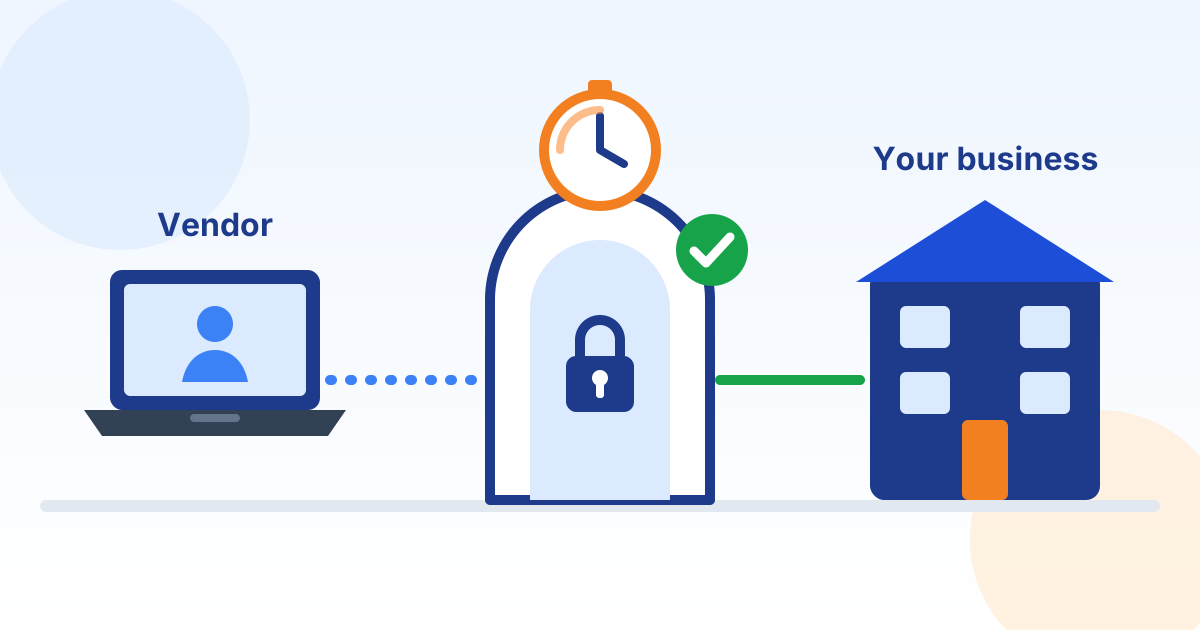
All vendor remote access goes through one company-controlled remote access gateway. The company owns the gateway, decides who may connect through it, and can end any session at any time.
- Vendors may not install their own remote access, screen sharing, or RMM software on company systems, or ask employees to install it, including "just for today".
- Always-on remote access tools, modems, and cellular routers installed by vendors are not allowed. Any found are disabled and reported to IT.
- Remote desktop and similar services on company computers and servers are never opened directly to the internet. Vendors reach them only through the approved gateway or tools.
- Company computers are set up, where practical, so that only approved programs can run (application allowlisting), which helps stop unapproved and portable remote access tools that do not need administrator rights.
- Employees never start a remote session for a caller they did not contact first through a known number or the approved process, even if the caller says they are from a vendor or IT.
5. Vendor Accounts and Sign-In
- Every vendor technician has an individual, named account. Shared, generic, or team vendor logins are not allowed.
- Every vendor account uses multi-factor authentication. Text message codes are allowed only where nothing stronger is supported.
- Vendor accounts with administrator rights use phishing-resistant MFA, such as security keys or passkeys.
- Company passwords are never given to vendors by email, text, or phone. Where a vendor must use a system credential, it is entered through the gateway or a company password vault without being shown, and changed after the work.
- Vendor accounts are created only after the vendor has been approved under the Vendor Risk Management Policy, and each account has an end date.
6. Requesting and Approving a Session
- The vendor, or the company employee who needs the work, requests access through the approved process, naming the technician, the systems, the work to be done, and the time needed.
- The owner of the affected system approves the request. Sessions on production equipment are also approved by the plant or operations manager.
- IT switches on access for that session only, limited to the systems named in the request.
- Access switches off automatically after no more than 4 hours, or earlier when the work is finished. Extensions are requested and approved the same way.
- The technician records what was done, and the system owner confirms the work and reports anything unexpected.
Emergencies. When an urgent outage needs a vendor immediately, the IT Manager or a manager may approve access by phone after calling the vendor back on a number already on file, and the request is recorded within one business day.
7. Least Privilege and Time Limits
- Vendors reach only the specific systems, applications, and data the approved work needs, not the whole network.
- Vendor access to company data is limited to what the work requires. Vendors may not copy, download, or keep company data unless the contract allows it and the system owner approves.
- Administrator rights are given only when the work requires them, and removed when it is done.
- File transfer and clipboard sharing through remote sessions are turned off unless the work needs them.
- Vendor accounts that have not been used for 90 days are disabled.
8. Supervision, Logging and Recording
Supervision. A company employee watches, or is available to watch, every session on critical systems: servers, firewalls, finance and payroll systems, backups, and plant equipment. Other sessions are logged and reviewed.
Logging. Every vendor session is logged with the technician's name, the vendor, the systems reached, the start and end time, and the approval it was made under.
Recording. Where the tool supports it, vendor sessions are also recorded as video, and recordings are kept for at least 90 days, or longer if a contract, law, or investigation requires it. Vendors are told that sessions are recorded.
Protecting the records. Logs and recordings are stored where vendors and the remote access tools themselves cannot change or delete them, are reviewed when something goes wrong, and are sampled at least every month for sessions that were not approved.
9. Standing Access for the Company IT Provider
The company's contracted IT provider may keep standing access, so it can respond to alerts and outages at any hour, only on these conditions, which the IT Manager confirms at every access review:
- Access is only through company-approved RMM and remote access tools listed in the contract, and the company can see which tools are installed.
- Every provider technician has a named account with MFA, and phishing-resistant MFA for administrator access where supported.
- The provider's accounts and activity are logged and monitored, and the company can see the logs on request.
- The provider tells the company promptly, and within the time the contract sets, about any security incident affecting its own systems or the company's.
- The provider removes its tools and accounts, and hands over all company credentials, when the contract ends.
- Standing access does not extend to plant equipment or the plant network, or to systems that store, process, or transmit payment card data or could affect their security. Access to those is switched on per session under this policy.
10. Remote Access to Plant and Machine Equipment
- Remote access to production machines, controllers, and plant computers follows the company Operational Technology (OT) and Plant Floor Security Policy as well as this policy.
- Vendors connect to plant equipment only through the approved method, through the firewall into the plant network, and never through a modem, cellular router, or tool they installed themselves.
- Every session on plant equipment is approved per session, coordinated with operations so the equipment is in a safe state, and ended when the work is done.
- Changes made remotely to machine programs or settings are recorded, and the program is backed up afterwards.
11. Contract Requirements
Contracts with vendors that have remote access include terms requiring the vendor to:
- Follow this policy, connect only with company-approved tools, and never install remote access software without written approval.
- Use a named account and MFA for each technician, and tell the company within one business day when a technician with access leaves or changes roles.
- Notify the company promptly of any security incident affecting the vendor's systems, tools, or accounts that could affect the company, within a time stated in the contract, and cooperate with the company's investigation.
- Protect any company credentials and data it handles, and return or securely destroy them when the work ends.
- Allow the company to review logs of the vendor's access to company systems.
Legal counsel reviews the final contract wording.
12. Access Reviews and Tool Checks
The IT Manager reviews every vendor account, every approved tool, and every vendor with standing access at least every three months. Each review confirms the vendor is still under contract, each technician still works for the vendor and still needs access, and the access matches the work. Access no longer needed is removed within 24 hours, and the review and changes are recorded.
IT checks company computers and servers every month for remote access, screen sharing, and RMM software that is not on the approved list, and removes anything found after confirming what it is and who installed it. An unexplained tool is treated as a possible incident.
13. Ending Vendor Access
When a vendor's work or contract ends, or a technician leaves the vendor, all related access is removed within 24 hours:
- Disable the vendor accounts and end any open sessions.
- Remove the vendor's remote access tools, agents, and any devices it installed.
- Change any passwords, keys, or codes the vendor knew or used.
- Get written confirmation that the vendor has returned or destroyed company data and credentials.
- Update the vendor and account lists, and record the steps taken.
14. When a Vendor or Its Tool Is Compromised
If a vendor reports a security incident, a remote access tool is reported as compromised, or anyone sees remote activity nobody approved, they report it immediately to the IT Manager. The company handles it under its Incident Response Policy and Plan, starting with these steps:
- Disable the vendor's access and accounts, end open sessions, and block the affected tool at the firewall and on company computers.
- Change passwords and keys the vendor knew, starting with administrator, email, banking, and backup accounts.
- Check company systems for remote access tools and accounts nobody approved, and review recent vendor session logs and recordings.
- Preserve logs and recordings, and ask the vendor in writing for the facts the company needs: what happened, when, which systems and data were affected, and what was fixed.
- Notify leadership, the cyber insurer, and legal counsel, who decide whether customers, employees, regulators, or law enforcement must be notified.
- Restore the vendor's access only after the vendor explains the cause and the fix, and the company approves.
15. Regulated Information
- Vendors reach personal information about employees or customers only when the work requires it, and the system owner approves each session.
16. Exceptions, Enforcement and Review
Exceptions. A requirement that cannot be met, for example because a vendor's product supports only its own remote tool, must be requested in writing from the IT Manager, with the reason, the risk, and the compensating control, such as keeping the tool disabled except during approved sessions. Exceptions are approved by the IT Manager, or by the Chief Executive Officer for high-risk exceptions, recorded, and reviewed at least every 12 months.
Enforcement. An employee who installs an unapproved remote access tool, shares a password with a vendor, or opens a session without approval may face disciplinary action, up to and including termination, consistent with applicable law. A vendor that breaks this policy may lose its access and its contract.
Policy review. The IT Manager reviews this policy no later than October 12, 2027, and after any incident involving vendor access. Changes are approved by the Chief Executive Officer.
17. Vendor Technician Acknowledgment
I have read and understand the [Company Name] Third-Party and Vendor Remote Access Policy. I will connect only through approved tools with my own named account and multi-factor authentication, stay within the approved work and time, never share credentials or install remote access software without written approval, and report any security incident promptly.
Name
Vendor company
Signature
Date
18. Document Control and Revision History
| Field | Value |
|---|---|
| Status | Draft generated from a template. Not in effect until reviewed by your legal counsel and approved and signed below. |
| Document | Third-Party and Vendor Remote Access Policy |
| Organization | [Company Name] |
| Document ID | PDC-TPRA-SAMPLE |
| Document version | 1.0 |
| Effective date | October 12, 2026 |
| Next scheduled review | October 12, 2027 |
| Policy owner | IT Manager |
| Approver (title) | Chief Executive Officer |
| Source template | Preferred Data Corporation Vendor Remote Access Policy template v1.0.1 |
| Template content last reviewed | October 12, 2026 |
Approval. Sign below to approve this document for adoption by [Company Name] after it has been reviewed by your legal counsel. Until it is signed, it is a draft and is not in effect.
Name
Title
Signature
Date
Revision history. Record every change to this policy below. Increase the document version and obtain approval again each time the policy is revised.
| Version | Date | Description of change | Approved by |
|---|---|---|---|
| 1.0 | October 12, 2026 | Draft generated from template v1.0.1; pending legal review and approval | Blank |
| Blank | Blank | Blank | Blank |
| Blank | Blank | Blank | Blank |
19. Template Notice and Legal Disclaimer
This document was generated from a starter template provided by Preferred Data Corporation. It is general information only. It is not legal advice and it is not a substitute for advice from a licensed attorney. Using the template does not create an attorney-client, consulting, or other professional relationship.
Preferred Data Corporation is not a law firm or an insurer. It makes no representation that this document is complete, current, or suitable for any particular organization, industry, jurisdiction, or regulatory requirement. To the fullest extent permitted by law, it is not responsible or liable for any loss or damage arising from the use of this template or of any policy created from it. You are solely responsible for how you adapt, adopt, and enforce it.
Laws, regulations, insurance requirements, and contracts that apply to your organization may require different or additional terms. The facts, deadlines, and legal references in this template were checked against their sources on the date shown as "Template content last reviewed" in Document Control, not on the effective date, and may have changed since. Before you adopt, publish, or rely on this document, and in every case where you have a legal, regulatory, or contractual obligation, have it reviewed by qualified legal counsel.
In an actual security incident or data breach, contact your attorney, your cyber insurer, and law enforcement where appropriate. Do not rely on this template alone to decide whether, when, or how to notify anyone.
If Preferred Data Corporation prepared this document for you as part of its services, your service agreement governs those services. The content of this document is still general information and should be reviewed by your own counsel before you adopt it.
This template is provided "as is", without warranties of any kind, including accuracy, completeness, or fitness for a particular purpose. Links to laws, agencies, and other websites are provided for convenience and may change. Use of this template is also subject to the Website and Free Resources Disclaimer and the Terms of Service at preferreddata.com/legal/disclaimer and preferreddata.com/legal/terms-of-service.
To report an error, contact Preferred Data Corporation at preferreddata.com/contact or (336) 886-3282 and include the Document ID shown in Document Control. Corrections are listed in the template changelog on the template's page at preferreddata.com/policy-templates.