Operational Technology (OT) and Plant Floor Security Policy
- Document ID
- PDC-OTS-SAMPLE
- Document version
- 1.0
- Template version
- v1.0.1
- Effective date
- October 12, 2026
- Next review
- October 12, 2027
1. Purpose
This policy sets how [Company Name] (the "company") protects the operational technology that runs its production: the machines, controllers, operator panels, supervisory software and plant computers that monitor and control physical equipment. Its goals are to keep people safe, keep production running, and stop a computer problem in the office from becoming a stopped line on the plant floor.
Why OT is different. Office systems can usually be patched, restarted and replaced quickly. Plant equipment often runs for decades, cannot be restarted without stopping production, and can hurt people or damage equipment if it behaves unexpectedly. Every rule in this policy is applied with safety and production in mind, and no security step may create an unsafe condition.
Framework. The policy follows NIST SP 800-82 Rev. 3, Guide to Operational Technology (OT) Security, and the primary mitigations for OT published by CISA, the FBI, the EPA and the Department of Energy, and uses the zones and conduits idea from the ISA/IEC 62443 series. Where a law, contract, customer requirement, or insurance policy sets a stricter requirement, the stricter requirement applies. Have qualified legal counsel review this policy before relying on it.
2. Scope and Definitions
This policy applies to all production and facility equipment at every [Company Name] site that has a processor, a network connection, or a port for programming, and to the computers, networks, software and remote connections used to run, program, or support it. It applies to employees, contractors, machine builders, system integrators, equipment vendors, and IT providers who work on that equipment.
- Operational technology (OT)
- Equipment and software that monitor or control physical machines and processes, as opposed to office IT such as email and accounting.
- PLC (programmable logic controller)
- A rugged industrial computer that runs a machine or process according to a program, for example starting a conveyor when a sensor sees a part.
- HMI (human-machine interface)
- The screen or touch panel an operator uses to see and control a machine or line.
- CNC controller
- The computer on a machining center, router, or cutting machine that follows a part program.
- SCADA and supervisory software
- Software that collects data from many machines and lets staff watch or adjust them from one place.
- Engineering workstation
- A PC or laptop used to write, change, or load programs onto PLCs, HMIs, robots, or CNC machines.
- IT/OT segmentation
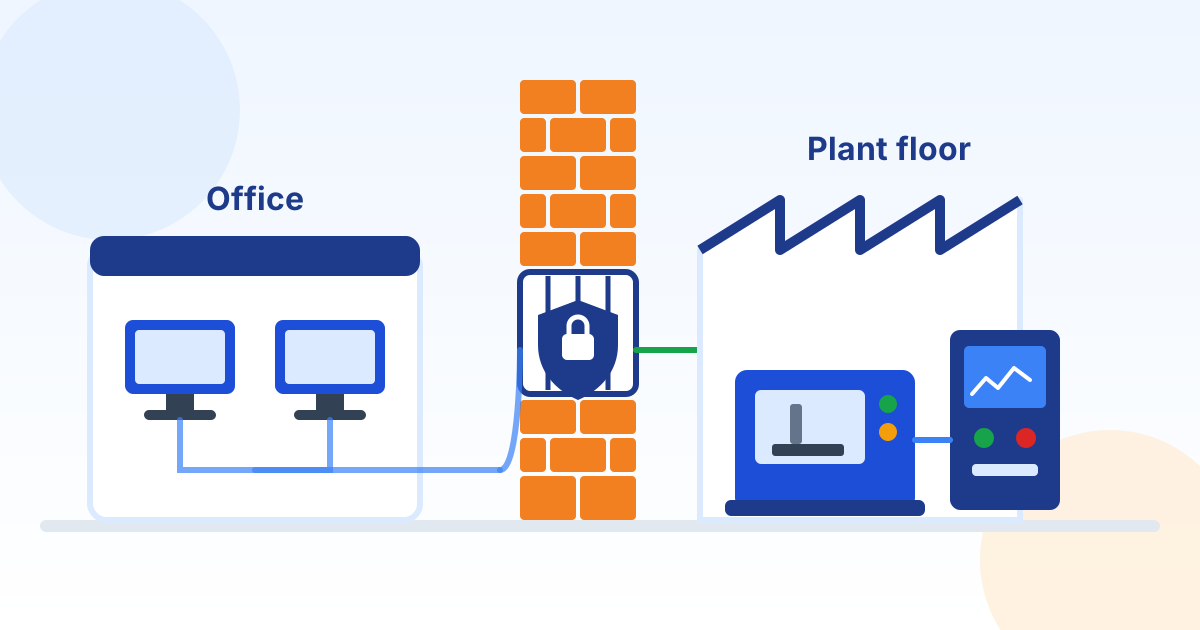
- Keeping the office network and the plant network separate, with a firewall controlling exactly what may pass between them.
- Zone and conduit
- A zone is a group of equipment with the same security needs, such as one production line. A conduit is the single, controlled path that traffic must use to get in or out of a zone.
- DMZ (demilitarized zone)
- A small in-between network where data passes from the plant to the office, so the two never connect directly.
- Compensating control
- A different protection used when the normal one cannot be applied, such as blocking a machine's network access because it cannot be patched.
3. Roles and Responsibilities
| Role | Responsibilities |
|---|---|
| Plant Manager (policy owner) | Owns this policy and the OT equipment list, approves changes and exceptions with IT, schedules maintenance windows, and reports to leadership. |
| IT Manager or IT provider | Designs and runs the firewalls and network separation, remote access, monitoring and backups, and advises on security updates. |
| Maintenance and controls staff | Keep machine programs and settings backed up, follow change and USB rules, and escort or supervise vendors. |
| Machine builders, integrators and vendors | Follow this policy and the Third-Party and Vendor Remote Access Policy, use only approved connections, and report changes they make. |
| Operators and plant staff | Use only approved media, never plug personal devices into plant equipment, and report unusual machine behavior right away. |
| Chief Executive Officer | Approves the policy, accepts risks that cannot be reduced, and funds replacement of unsupported equipment. |
4. Safety and Production Come First
- No security change, scan, update, or test is made to plant equipment or the plant network without a written plan agreed with the Plant Manager or the production supervisor for that area.
- Changes are made during planned downtime or maintenance windows, with a way to undo the change and a person on site who can run the equipment safely.
- Live production equipment is never used for testing. Updates and new settings are tried first on a spare, a test system, or with the machine vendor's approval.
- Safety systems, such as safety PLCs, light curtains, emergency stops, and guarding interlocks, are never bypassed, changed, or disconnected for security work without review by a qualified person.
- Active network scanning is not run on the plant network unless the equipment vendor confirms it is safe, because some controllers can fault when scanned.
- Lockout and tagout and every other safety procedure apply to all security work exactly as they do to any other maintenance.
5. OT Equipment Inventory
The Plant Manager keeps a list of every PLC, HMI, CNC controller, robot, drive, SCADA server, engineering workstation, industrial network switch, wireless link, and plant PC. For each item the list records:
- What it is, where it is, and which line or process it runs.
- Make, model, serial number, firmware or software version, and whether the manufacturer still supports it.
- Its network address and every connection it has, including modems, cellular routers, and vendor remote access.
- Who maintains it, including the machine builder or integrator and how to reach them.
- Where its latest program and configuration backup is stored.
The list is updated every time equipment is added, changed, or removed, and checked against what is actually on the floor once a year. Equipment found that is not on the list is reported to the Plant Manager and IT.
6. Separating the Plant Network from the Office
- The plant network is separate from the office network. A firewall between them blocks all traffic except specific connections that are documented and approved.
- Office computers never connect directly to plant equipment. Any data the office needs from the plant, such as production counts or job status, passes through a small in-between network (a DMZ) that both sides talk to.
- Plant equipment is grouped into zones, such as one line, cell, or building, based on what it does and how critical it is. Traffic between zones passes only through controlled paths (conduits) with firewall rules.
- Email and web browsing are not allowed on plant computers, controllers, or engineering workstations, except to reach a specific approved site such as a vendor update service.
- Network cables, ports, and switches for the plant network are labeled so they are not confused with office equipment, and unused switch ports are disabled where practical.
- Plant wireless networks are separate from office and guest Wi-Fi, use strong encryption, and connect only approved devices.
Firewall rules between the office and plant are reviewed at least once a year, and any rule nobody can explain is removed.
7. No Direct Internet Exposure
- No PLC, HMI, CNC controller, SCADA system, or plant PC may be reachable directly from the internet, including through a cellular modem, a port forward, or a vendor cloud service that has not been approved.
- Default passwords on every piece of plant equipment and software are changed before use, or when found, to strong, unique passwords stored in the company password manager.
- IT checks at least every three months that no plant equipment can be reached from the internet, using an outside scan of the company's internet addresses, and closes any exposure it finds the same day it is confirmed, coordinating with the area supervisor so the change is safe for people and production.
- A vendor cloud service that connects to plant equipment, such as a machine monitoring portal, is approved by the policy owner and IT before it is connected, and is listed in the equipment inventory.
8. Vendor and Integrator Remote Access
Remote access to plant equipment by vendors, machine builders, integrators, and the company's IT provider follows the company Third-Party and Vendor Remote Access Policy. All remote access to plant equipment, including by company staff, also follows these rules:
- Remote access to plant equipment uses only the company-approved remote access method, through the firewall into the plant network. No vendor may install a modem, cellular router, or always-on remote access tool on plant equipment.
- Each remote session is approved in advance and turned on only for the session. Each technician uses a named account with multi-factor authentication, and the access is limited to the specific machine or line being worked on.
- The Plant Manager or the area supervisor knows when a session is happening, confirms the equipment is in a safe state for the work, and can end the session at any time.
- Changes made remotely are recorded and the program is backed up afterwards, under the change rules in this policy.
- Vendor accounts that have not been used for 90 days are disabled.
Vendor laptops on site. Before a vendor laptop is connected to plant equipment or the plant network, maintenance or IT staff confirm it has current security updates and working anti-malware, or the vendor uses a company-provided engineering laptop instead.
9. USB Drives and Removable Media
USB ports and other removable media are blocked on plant equipment wherever the equipment allows it. Where media is needed, for example to load a CNC program or update an HMI, only company-issued drives are used, and they are checked at a dedicated scanning station before every use on the plant floor.
- Personal USB drives, phones, and other personal devices are never plugged into plant equipment, including for charging.
- Media from vendors, customers, or other outside sources is scanned before use, and its contents are copied to a company drive rather than used directly where practical.
- Unused USB and network ports on plant computers are disabled or physically blocked where practical.
- Drives found on the floor or received unexpectedly are handed to IT, never plugged in.
10. Updates and Machines That Cannot Be Patched
Updates. IT and the Plant Manager review new security updates for plant computers and equipment within 30 days of release. Updates are installed only after the equipment vendor confirms they are compatible, where the vendor offers that confirmation, and are tested first wherever possible. They are installed during a planned maintenance window, with a backup taken first and a way to undo the change.
Unsupported and unpatchable equipment. Plant equipment often stays in service for decades and may run software the manufacturer no longer supports. When equipment cannot be updated, it may stay in service only with compensating controls, such as:
- No internet access and no direct connection to the office network.
- Its own zone or firewall rules that allow only the specific connections it needs.
- USB ports blocked, and unneeded software, services, and accounts removed with the machine vendor's guidance.
- Application allowlisting, which lets only approved programs run, where the vendor supports it.
- Extra monitoring of its network traffic, and a current, tested backup.
Each unsupported item is recorded as an exception with its compensating controls, reviewed every year, and included in a replacement or upgrade plan that the Chief Executive Officer reviews with the capital budget.
11. Backups and Running Without the Network
The following are backed up after every program or configuration change, and at least every three months even when nothing has changed:
- PLC programs, HMI and SCADA projects, CNC part programs, robot programs, drive parameters, and network device configurations.
- Engineering workstation software, license keys, installation media, and the passwords needed to restore them, stored securely.
- Wiring diagrams, network drawings, and vendor documentation needed to rebuild a machine.
At least one copy of every backup is kept off-site or offline, where an incident affecting the plant or the office network cannot change or delete it.
Restore tests. At least once a year, a sample of backups is restored to spare or test equipment, or checked against the running program, to prove the backups are complete and usable.
Manual operation. For each critical line or process, the Plant Manager documents how to run it safely, or shut it down safely, if supervisory systems or the network are unavailable, and practices that plan at least once a year.
12. Changes to Plant Equipment
- Changes to PLC programs, HMI projects, machine settings, plant computers, and plant network equipment are approved in advance by the Plant Manager or production manager and IT together, except in an emergency where safety or production requires an immediate fix, which is recorded and reviewed afterwards.
- Each change records what changed, why, who made it, when, and how to undo it.
- A backup is taken before and after each change, and the equipment inventory is updated.
- Programs are changed only from approved engineering workstations or vendor laptops checked under this policy.
- PLC and safety system key switches are kept in the Run position, with keys removed and stored securely, except while someone is actively programming the controller.
13. Monitoring the Plant Network
Firewall, remote access, and plant computer logs are collected in one place. Alerts are set for new devices on the plant network, blocked traffic between the office and plant, and remote access outside an approved session, and the logs are reviewed at least once a week.
Logs are kept for at least one year, or longer where a contract or law requires it, and are protected so that the remote access tools and accounts being monitored cannot change or delete them.
14. Incident Response for the Plant Floor
Suspected cyber incidents affecting plant equipment are handled under the company Incident Response Policy and Plan, with these plant-floor rules. Anyone who sees a machine behaving unexpectedly, a ransom message, or unknown remote activity reports it immediately to the area supervisor and the Plant Manager.
- Make the area safe first. Follow normal safety procedures, and stop or isolate equipment only in a way that is safe for people and the process.
- Contain the spread by blocking connections between the office and plant networks at the firewall and ending all remote access sessions, as directed by IT and agreed with the area supervisor, so that equipment that depends on office systems is first moved to a safe state.
- Do not power off, wipe, or reprogram controllers or plant computers unless needed for safety, so that evidence is preserved and the equipment can be restored correctly.
- Switch critical processes to manual operation or a safe shutdown under the manual operation plan.
- Bring in the machine builder or integrator and the company IT or incident response provider before restoring equipment, and restore from known-good backups.
- Notify leadership, the company's cyber insurer, and legal counsel, who decide whether customers, regulators, or law enforcement must be told.
- After recovery, review what happened, update this policy and the equipment inventory, and fix the gaps found.
15. Customer and Regulatory Requirements
- Security requirements in customer contracts and supplier questionnaires that apply to production systems are recorded and checked against this policy each year.
- Physical access to control rooms, server cabinets, and network closets on the plant floor is limited to authorized staff and escorted visitors.
16. Training for Plant Staff
Plant staff, maintenance and controls technicians, and supervisors complete short security training when they start and at least once a year. It covers the USB and personal device rules, recognizing phishing, how vendors may connect, and how to report unusual machine behavior to the Plant Manager.
17. Exceptions, Enforcement and Review
Exceptions. A requirement that cannot be met, for example because a machine cannot support it, must be requested in writing from the Plant Manager, with the reason, the risk, and the compensating control. Exceptions are approved by the Plant Manager and IT together, or by the Chief Executive Officer for high-risk exceptions, recorded, and reviewed at least every 12 months.
Enforcement. Connecting unapproved devices or media to plant equipment, installing remote access tools, or bypassing network separation may result in loss of access and disciplinary action, up to and including termination for employees, or the end of the engagement for vendors, consistent with applicable law and contracts.
Policy review. The Plant Manager reviews this policy with IT no later than October 12, 2027, and after any incident affecting plant equipment or any major change to the plant network. Changes are approved by the Chief Executive Officer.
18. Acknowledgment
I have read and understand the [Company Name] Operational Technology (OT) and Plant Floor Security Policy. I will use only approved media and connections on plant equipment, never plug personal devices into it, follow the change and safety rules, and report unusual machine behavior or remote activity immediately.
Name
Company (for contractors)
Signature
Date
19. Document Control and Revision History
| Field | Value |
|---|---|
| Status | Draft generated from a template. Not in effect until reviewed by your legal counsel and approved and signed below. |
| Document | Operational Technology (OT) and Plant Floor Security Policy |
| Organization | [Company Name] |
| Document ID | PDC-OTS-SAMPLE |
| Document version | 1.0 |
| Effective date | October 12, 2026 |
| Next scheduled review | October 12, 2027 |
| Policy owner | Plant Manager |
| Approver (title) | Chief Executive Officer |
| Source template | Preferred Data Corporation OT and Plant Floor Security Policy template v1.0.1 |
| Template content last reviewed | October 12, 2026 |
Approval. Sign below to approve this document for adoption by [Company Name] after it has been reviewed by your legal counsel. Until it is signed, it is a draft and is not in effect.
Name
Title
Signature
Date
Revision history. Record every change to this policy below. Increase the document version and obtain approval again each time the policy is revised.
| Version | Date | Description of change | Approved by |
|---|---|---|---|
| 1.0 | October 12, 2026 | Draft generated from template v1.0.1; pending legal review and approval | Blank |
| Blank | Blank | Blank | Blank |
| Blank | Blank | Blank | Blank |
20. Template Notice and Legal Disclaimer
This document was generated from a starter template provided by Preferred Data Corporation. It is general information only. It is not legal advice and it is not a substitute for advice from a licensed attorney. Using the template does not create an attorney-client, consulting, or other professional relationship.
Preferred Data Corporation is not a law firm or an insurer. It makes no representation that this document is complete, current, or suitable for any particular organization, industry, jurisdiction, or regulatory requirement. To the fullest extent permitted by law, it is not responsible or liable for any loss or damage arising from the use of this template or of any policy created from it. You are solely responsible for how you adapt, adopt, and enforce it.
Laws, regulations, insurance requirements, and contracts that apply to your organization may require different or additional terms. The facts, deadlines, and legal references in this template were checked against their sources on the date shown as "Template content last reviewed" in Document Control, not on the effective date, and may have changed since. Before you adopt, publish, or rely on this document, and in every case where you have a legal, regulatory, or contractual obligation, have it reviewed by qualified legal counsel.
In an actual security incident or data breach, contact your attorney, your cyber insurer, and law enforcement where appropriate. Do not rely on this template alone to decide whether, when, or how to notify anyone.
If Preferred Data Corporation prepared this document for you as part of its services, your service agreement governs those services. The content of this document is still general information and should be reviewed by your own counsel before you adopt it.
This template is provided "as is", without warranties of any kind, including accuracy, completeness, or fitness for a particular purpose. Links to laws, agencies, and other websites are provided for convenience and may change. Use of this template is also subject to the Website and Free Resources Disclaimer and the Terms of Service at preferreddata.com/legal/disclaimer and preferreddata.com/legal/terms-of-service.
To report an error, contact Preferred Data Corporation at preferreddata.com/contact or (336) 886-3282 and include the Document ID shown in Document Control. Corrections are listed in the template changelog on the template's page at preferreddata.com/policy-templates.