
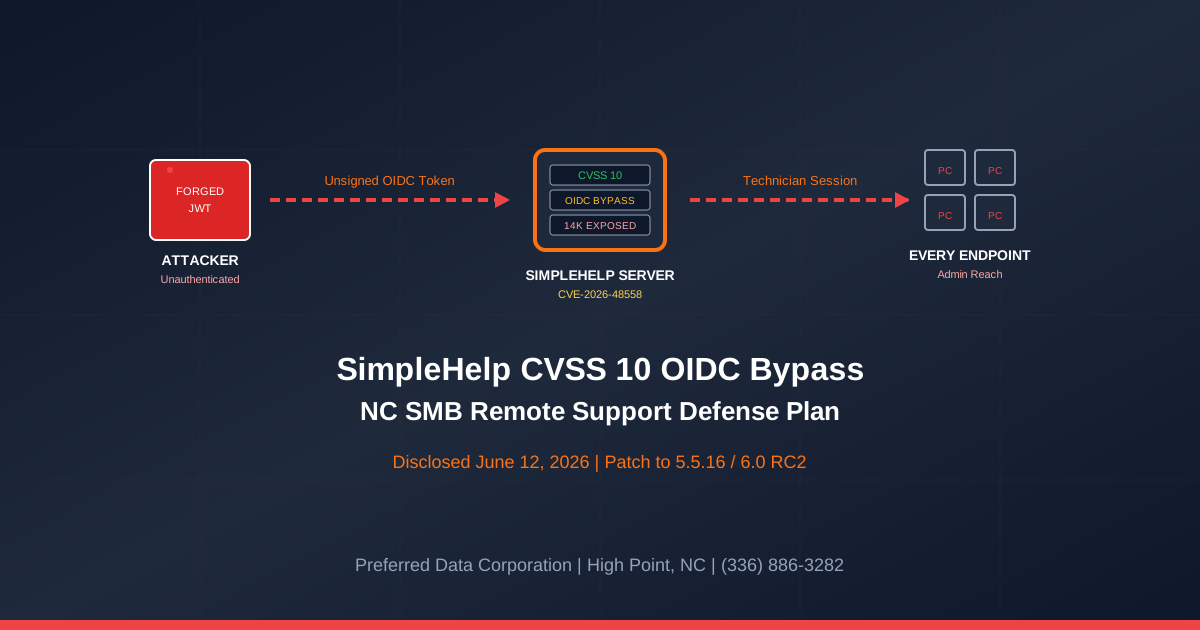
TL;DR: On June 12, 2026, Horizon3.ai disclosed CVE-2026-48558, a CVSS 10 OIDC authentication bypass in SimpleHelp that lets an unauthenticated attacker mint a fully privileged "Technician" account by submitting a forged identity token. Nearly 14,000 internet-facing SimpleHelp servers were exposed at disclosure per Cybersecurity News reporting. Because Technician accounts can remote-control every managed endpoint, run scripts, and perform administrative actions, this is a one-shot path to compromising every NC small business an MSP supports.
Key takeaway: The remote support tool is the most privileged piece of software in a small business: it can reach every endpoint, install anything, exfiltrate anything. A CVSS 10 unauthenticated bypass in that tool is a 72-hour patch event, not a "next maintenance window" event.
Use SimpleHelp - or work with an MSP that does? Preferred Data Corporation has supported NC small businesses since 1987 and can audit your remote support exposure this week. Call (336) 886-3282 or request a SimpleHelp exposure review.
What is CVE-2026-48558 and why is the severity rated CVSS 10?
CVE-2026-48558 is an OIDC authentication bypass in SimpleHelp versions 5.5.15 and prior (and 6.0 pre-release builds) that allows a remote, unauthenticated attacker to log in as a fully privileged Technician without valid credentials. Per Horizon3.ai's technical writeup, when OIDC SSO is configured, identity tokens are accepted during login without verifying their cryptographic signature, so an attacker can submit a forged token containing any identity claims and obtain a fully authenticated technician session. The CVSS 10 rating reflects three facts at once: the attack is unauthenticated, network-reachable, and grants administrative control over every endpoint the server manages.
Three reasons this is not a routine "patch on Tuesday" CVE for NC SMBs:
- Pre-auth bypass. No credential theft, no phishing, no MFA prompt. The attacker only needs to reach the SimpleHelp portal over HTTPS.
- Full Technician privileges. Per Cybersecurity News, Technician accounts can remotely access managed endpoints, execute scripts, and perform administrative actions, which is the same capability a domain admin would have - delivered to an unauthenticated attacker.
- 14,000 exposed servers at disclosure. Internet-facing SimpleHelp servers were that high at the time of Horizon3's writeup. The number that remain unpatched in week two is what matters for NC SMBs.
How does the OIDC token forgery actually work?
OIDC tokens are JSON Web Tokens (JWTs) cryptographically signed by an identity provider; SimpleHelp's login flow was supposed to verify that signature before trusting the identity claims inside the token. Per Horizon3.ai's vulnerability writeup, the vulnerable builds skipped the signature check and accepted whatever identity the token claimed. An attacker can therefore craft a JWT in any text editor, set "role":"technician" or any other claim the server expects, and submit it to the login endpoint. The server treats the forged claims as authoritative and issues a valid technician session.
The four-step attack chain:
- Find the SimpleHelp portal. Shodan and Censys index SimpleHelp servers by name; per Cybersecurity News, nearly 14,000 internet-facing servers were exposed.
- Forge a token. The attacker creates a JWT with arbitrary identity claims; no signing key is required because the server never verifies the signature.
- Submit the token. The attacker calls the OIDC login endpoint and receives a valid technician session cookie.
- Pivot to every managed endpoint. Technician sessions can launch remote sessions, run scripts, install software, and harvest credentials across every endpoint registered to that SimpleHelp server.
Quotable definition: CVE-2026-48558 is a CVSS 10 OIDC authentication bypass in SimpleHelp that allows an unauthenticated attacker to create a fully privileged Technician account by submitting a forged identity token, granting administrative remote control over every endpoint the SimpleHelp server manages.
Why is this CVE uniquely dangerous for NC small businesses and the MSPs that serve them?
Because the remote support tool is the single most privileged software in a small business network: it can reach every endpoint, install anything, run anything, and read anything. NC SMBs in manufacturing, distribution, professional services, and defense typically have a remote support tool already - either run by their MSP or by an internal IT person - and that tool's session token equals "domain admin everywhere." A pre-auth CVSS 10 bypass on the remote support server is the same blast radius as a domain compromise, delivered to anyone on the public internet.
| Compromise vector | Privilege at first foothold | Reach across endpoints | Time to detect | Patch urgency |
|---|---|---|---|---|
| Phishing → user mailbox | Single user mailbox | Lateral movement required | Hours to days | 14-30 days |
| Stolen RDP credential | Single host | Manual pivoting | Hours to days | 7-14 days |
| VPN auth bypass | Network access | Lateral movement required | Hours to days | 7 days |
| SimpleHelp CVE-2026-48558 | Technician (admin) at the support server | Every managed endpoint at once | Minutes | 72 hours |
| Domain admin compromise | Domain admin | Every domain-joined host | Minutes | 24 hours |
Per Horizon3.ai's IOC writeup, the indicators to look for include new Technician account creation outside of business hours, unusual remote session activity, and OIDC login events with malformed or mismatched signatures. NC SMBs that run SimpleHelp themselves should pull these logs and check before assuming they are not affected.
Which NC small businesses are most exposed to CVE-2026-48558?
NC SMBs that run their own SimpleHelp instance for internal IT, NC MSPs that use SimpleHelp to support customers in the Piedmont Triad and across the state, and NC SMBs that purchase remote support services from a smaller MSP that has not yet patched. The exposure does not require any action by the NC SMB itself - the vulnerability lives at the SimpleHelp server, which is usually operated by the IT team or the MSP.
The highest-exposure NC SMB profiles:
- NC manufacturers in High Point, Winston-Salem, and Greensboro running self-hosted SimpleHelp for plant-floor remote troubleshooting. A self-hosted SimpleHelp portal exposed to the internet for after-hours technician access is exactly the configuration the attacker is scanning for. See our Managed IT services page for plant-floor support models.
- NC distributors and 3PLs in Charlotte and Raleigh with internal help desk teams. Many distributors deployed SimpleHelp during the 2020-2022 remote work pivot and never moved off it; that long-running deployment is the most likely to be on a vulnerable build.
- NC professional services firms (legal, accounting, engineering) in Raleigh, Charlotte, and Winston-Salem. Firms that rely on a single IT person who runs a SimpleHelp portal for after-hours support carry the highest exposure because there is no second pair of eyes to flag the patch.
- NC SMBs whose MSP runs a shared SimpleHelp instance. A single compromised MSP SimpleHelp server can reach every customer endpoint the MSP supports; the MSP's patch posture becomes your patch posture.
- NC defense contractors and CMMC-scoped firms. Per CISA's SMB guidance, a pre-auth admin compromise of a tool that touches CUI-bearing endpoints is a reportable event under CMMC 2.0 and DFARS 252.204-7012.
Not sure whether your IT provider runs SimpleHelp - and whether it's patched? Call (336) 886-3282 or request a remote support tool exposure review.
What should NC SMBs do this week to defend against CVE-2026-48558?
Run a five-step plan over the next seven days. The first four steps cost nothing and the fifth is a configuration change, not a product purchase. Per Horizon3.ai, upgrading to SimpleHelp 5.5.16 or 6.0 RC2 closes the vulnerability; the four steps before the patch keep you safe in the gap.
- Ask your MSP today (day 1). Send a written question: "Do you run SimpleHelp on our behalf, and is it on version 5.5.16 or 6.0 RC2 or later?" Get the answer in writing. If you run SimpleHelp yourself, check the version in the admin console.
- Block public access to the SimpleHelp portal (days 1-2). If you do not need the portal reachable from the open internet, put it behind a VPN, behind Cloudflare Zero Trust, or behind a firewall rule that allows only your office IP. Per Horizon3.ai's mitigations, IP restrictions are the recommended interim control.
- Audit Technician accounts (days 2-3). Pull a list of every Technician account in the SimpleHelp admin panel. Delete any that you do not recognize. Rotate passwords on every account that remains.
- Pull OIDC login logs (days 2-4). Look for OIDC login events with malformed or unsigned tokens, and look for Technician accounts created outside of business hours. Match against Horizon3.ai's IOCs.
- Patch to 5.5.16 or 6.0 RC2 (days 5-7). Schedule the upgrade. Test on a staging instance if you have one. Do not delay past day 7. Reference our Cybersecurity services for change-management support.
Key takeaway: The first action is asking your MSP a written question. NC SMBs cannot patch a tool they do not know is running on their behalf. The 30-minute exchange is the highest-ROI security step of the next seven days.
How does Preferred Data Corporation help NC SMBs respond to remote support tool risk?
PDC has supported NC small businesses since 1987 and treats remote management tools as tier-one assets. We bring three things to the CVE-2026-48558 conversation:
- Managed IT services: A patched, monitored, network-restricted remote support stack with documented technician accounts and an audit trail. For NC manufacturers in High Point, distributors in Greensboro, and professional services firms in Charlotte and Raleigh, our managed baseline keeps remote support out of the public internet and out of the headlines.
- Cybersecurity services: Remote support tool exposure assessments, OIDC and SSO hardening reviews, incident-response runbooks for suspected technician-account compromise, and CMMC-aligned access controls for NC defense contractors.
- AI Transformation services: Governance for the next generation of remote support - AI-assisted ticket triage, agentic remote remediation, and the policy work that keeps automated tools inside scoped privileges. The same lesson from CVE-2026-48558 applies to every new tool you bolt onto the support stack.
For small business owners in High Point, the Piedmont Triad, Greensboro, Winston-Salem, Charlotte, and Raleigh, CVE-2026-48558 is the cue to treat your remote support tool with the same rigor as your domain controller. The CISA SMB resources say the same: SMBs face enterprise-grade exposure with a fraction of the staff. A trusted local partner closes the gap.
Ready to know whether your remote support tool is patched and locked down? Call (336) 886-3282 or book a SimpleHelp exposure review.
Frequently Asked Questions
What is CVE-2026-48558?
CVE-2026-48558 is a CVSS 10 authentication bypass in SimpleHelp's OIDC login flow disclosed by Horizon3.ai on June 12, 2026. The server fails to verify the cryptographic signature on incoming identity tokens, allowing an unauthenticated attacker to forge a token, log in as a Technician, and gain full administrative control over every endpoint the server manages. Affected versions are SimpleHelp 5.5.15 and prior and 6.0 pre-release builds.
How many SimpleHelp servers are exposed?
Per Cybersecurity News reporting, nearly 14,000 internet-facing SimpleHelp servers were exposed at the time of disclosure. The number of unpatched servers is what matters for NC SMBs - the patched versions (5.5.16 and 6.0 RC2) close the vulnerability immediately.
Does my SMB use SimpleHelp if my MSP does?
Yes, effectively. The MSP's SimpleHelp server controls every endpoint the MSP supports, including yours. A compromise of the MSP's SimpleHelp server reaches every customer at once. NC SMBs should ask their MSP - in writing - which remote support tool they use, what version it is, and whether it is on the patched build.
What if I cannot patch SimpleHelp immediately?
Per Horizon3.ai's mitigations, restrict access to the SimpleHelp portal by IP address in Administration → Login Security. Put the portal behind a VPN or behind Cloudflare Zero Trust. The goal is to remove the unauthenticated attacker's ability to reach the login endpoint until the patch lands.
Will MFA protect me from CVE-2026-48558?
No. The bypass happens before any MFA prompt. The attacker submits a forged identity token and the server issues a session without ever invoking the MFA flow. The only fix is the patch (or IP-restricted access in the interim).
What is the first thing an NC SMB should do this week?
Send your MSP a written question: "Do you run SimpleHelp on our behalf, and is it on version 5.5.16 or 6.0 RC2 or later?" If you run it yourself, check the version. Restrict portal access by IP if you cannot patch within 72 hours. Audit Technician accounts. Then schedule the upgrade.
Related Resources
- Cybersecurity Services for NC Small Businesses - Remote support tool hardening and incident response
- Managed IT Services for NC Businesses - Patched, monitored remote support and endpoint baselines
- AI Transformation Services for NC Businesses - Governance for AI-assisted remote support
- Veeam CVE-2026-44963 Backup RCE Defense NC SMB 2026 - Backup tool patch lessons
- Cisco ISE & Webex CVE Defense NC SMB 2026 - Pre-auth bypass patterns
- Palo Alto GlobalProtect CVE-2026-0257 NC SMB Defense - Auth bypass at the perimeter
- Contact Preferred Data Corporation - Remote support tool exposure review for NC SMBs