
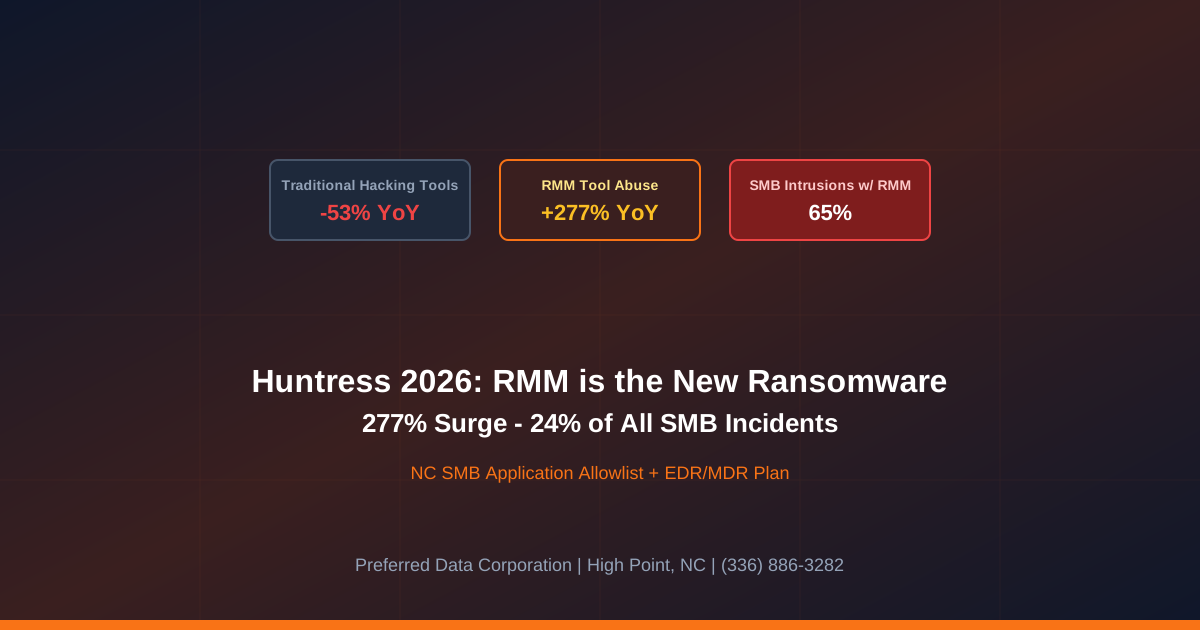
TL;DR: The Huntress 2026 Cyber Threat Report documents a 277% year-over-year surge in attacker abuse of legitimate Remote Monitoring and Management (RMM) tools, with RMM abuse now the most common single threat category at roughly 24% of all observed incidents. In 65% of intrusions inside small business environments, the adversary either hijacked the MSP's own RMM tooling or installed a rogue RMM (Atera, ScreenConnect, AnyDesk, Splashtop, NinjaOne, etc.) to maintain persistence. For NC small businesses, this redraws the threat model: the same tool that lets your MSP support you is the one most likely to be weaponized against you. The fix is application allowlisting, RMM governance, and 24/7 detection of unauthorized remote-access binaries.
Key takeaway: RMM tools are the new ransomware launchpad. SMBs that survive 2026 are the ones that allowlist exactly one RMM, blocklist the rest, and run 24/7 detection for the moment a rogue RMM lands on an endpoint.
Worried your MSP's RMM, or a rogue copy of one, would go undetected on your endpoints? Preferred Data Corporation runs managed application control and 24/7 EDR/MDR for NC small businesses. Call (336) 886-3282 or request an RMM exposure review.
What does the Huntress 2026 report actually say about RMM abuse?
It says RMM abuse is now the dominant attack archetype against SMBs, full stop. Per Huntress's analysis, threat actors registered a 277% year-over-year increase in RMM abuse in 2025, while traditional hacking-tool sightings dropped 53% in parallel. RMM abuse now accounts for approximately 24% of all incidents Huntress observed in SMB environments. Salt Data's reading of the 2026 report and Dark Reading's coverage document the same shift: attackers are moving away from custom malware and toward signed, trusted, often whitelisted commercial software that already runs in SMB environments.
Three reasons this matters more for SMBs than enterprises:
- RMM is signed software. Endpoint AV and even some EDRs will not block Atera, ConnectWise ScreenConnect, AnyDesk, Splashtop, NinjaOne, Action1, SimpleHelp, or TeamViewer by default. They are legitimate tools used by legitimate IT shops.
- SMBs run multiple RMMs in practice. Prior MSP relationships, a one-off project consultant, a vendor that "just needs five minutes," and the in-house generalist's preferred tool stack on top of each other. Each is a persistence path.
- 65% of SMB incidents involve hijacked or rogue RMM. Per the Huntress SMB Threat Report, the dominant SMB intrusion pattern in 2026 is "attacker arrives on RMM the SMB already trusts."
For an NC small business, that is a categorically different threat than email-borne malware. You cannot stop it with a spam filter.
Why are attackers shifting from custom malware to legitimate RMM?
Because it is faster, cheaper, signed, and harder to detect. Per Huntress's RMM gateway research and Dark Reading's coverage, the economics flipped in 2024-2025:
- Free or trial-tier RMMs are abundant. Atera, Action1, SimpleHelp, and ScreenConnect all offer free or trial accounts that a threat actor can stand up in minutes.
- Signed binaries bypass AV. Most endpoint AV products allowlist signed RMM agents by vendor reputation. EDR products that do detect them often log rather than block.
- No payload to write. Once an RMM is on the box, the attacker has remote shell, file transfer, screen view, scheduled tasks, and lateral movement primitives without writing a single line of custom code.
- Living off the land defeats simple IOCs. Threat intel feeds full of malware hashes are useless against AteraAgent.exe running with a stolen invite token.
| Old pattern (2022-2023) | New pattern (2026) | Why it matters for SMBs |
|---|---|---|
| Phishing → Office macro → Cobalt Strike | Phishing → ClickFix → rogue Atera install | Signed RMM beats AV |
| Custom backdoor on disk | Trial-tier ScreenConnect | No custom payload, no IOC |
| Lateral movement via PsExec | Lateral movement via RMM bulk-deploy | One panel, many endpoints |
| Detection by AV hash | Detection requires behavior + allowlist | EDR/MDR with policy required |
| Single-victim attack | One MSP → many SMB tenants | Bulk SMB compromise |
The structural answer is not "buy a smarter AV." It is application control plus 24/7 behavior monitoring plus RMM governance.
What does this mean for NC small businesses in practice?
If your endpoint policy does not explicitly allowlist exactly one RMM and blocklist the rest, you have a 24% chance per incident that the attacker is already inside on a tool you cannot tell apart from your own. Per the 2026 Verizon DBIR and Huntress 2026 SMB Threat Report, 96% of ransomware victims for which size was known were SMBs, and the most common 2026 SMB intrusion does not start with a sophisticated malware kit; it starts with a rogue RMM dropper or a hijacked MSP RMM session.
For a Piedmont Triad small business, the exposure stacks predictably:
- Endpoint sprawl. A typical 50-person manufacturer has laptops, plant-floor terminals, production HMIs, accounting workstations, and remote sales reps. Each is an RMM landing zone.
- Vendor remote access. ERP vendor, machine OEM, payroll provider, audit firm, marketing agency, MSP. Each one historically asked for "five minutes of remote access."
- Cyber insurance now keys off application control. Per Help Net Security, 2026 cyber insurance applications now ask explicitly about application allowlisting and rogue-tool detection.
The defense pattern that works is one allowlisted RMM, an enforced blocklist for the rest, EDR/MDR in block mode with tamper protection, and a documented vendor remote-access policy.
Quotable definition: RMM tool abuse is the 2026 attack pattern in which a threat actor uses legitimate, signed Remote Monitoring and Management software (Atera, ScreenConnect, AnyDesk, Splashtop, NinjaOne, Action1, SimpleHelp, TeamViewer) to gain initial access, persistence, lateral movement, and ransomware deployment without deploying custom malware, exploiting trust in vendor-signed binaries that endpoint AV typically allowlists.
What should an NC small business do this quarter?
Treat RMM as a privileged surface and govern it accordingly. The Huntress data makes the priority order obvious.
- Pick exactly one RMM and allowlist it. Your MSP's. Everything else gets blocked at the endpoint and alerted on at the SOC. Document the choice and the policy.
- Blocklist the common rogue RMMs. Atera, Action1, SimpleHelp, ScreenConnect, AnyDesk, Splashtop, NinjaOne, TeamViewer, RustDesk. Allow only the ones your business explicitly uses, and enforce via Microsoft Defender Application Control or equivalent.
- Deploy EDR/MDR in block mode with tamper protection. Behavior-based detection that flags unauthorized remote-access binaries the moment they land, not after they execute.
- Establish a written vendor remote-access policy. No vendor gets ad-hoc RMM access. Use your single approved RMM with time-boxed, audited sessions for all third-party support.
- Hunt for existing rogue RMM right now. Scan every endpoint for the list above. A common finding in NC SMB engagements is two to five rogue RMM agents on production endpoints from forgotten vendor sessions.
- Vet your MSP's RMM hygiene. Multi-tenant MFA on the RMM panel, signed approvals for after-hours scripts, audit logging, and a documented incident response plan for RMM panel compromise. If your MSP cannot answer those questions, your MSP is the risk.
- Document for cyber insurance. Allowlist policy, blocklist enforcement evidence, EDR coverage, MDR SOC contract, and incident response readiness. Underwriters now expect this in writing.
Need this restructured for your business? Call (336) 886-3282 or contact Preferred Data Corporation for an RMM exposure review.
Why is this a managed problem, not a single-tool problem?
Because the attacker only has to find one un-allowlisted endpoint and one missed alert. Per the 2026 Huntress SMB Threat Report, Verizon 2026 DBIR, and Dark Reading's analysis of RMM-led phishing, the defenders that hold up against RMM-led intrusions all run the same stack: application allowlisting policy + EDR/MDR in block mode + 24/7 SOC + vendor remote-access governance + tested incident response. That is a managed program, not a product line.
For a Piedmont Triad small business, the answer is clear. Pick a managed partner that runs one allowlisted RMM with documented multi-tenant MFA, deploys EDR/MDR with rogue-tool blocking, and operates a 24/7 SOC that responds in minutes when an unauthorized RMM lands. Preferred Data Corporation has delivered that managed protection to North Carolina small businesses since 1987, from our High Point headquarters and on-site across the Piedmont Triad, Charlotte, Greensboro, Raleigh, and Winston-Salem.
PDC supports this through managed cybersecurity, managed IT services, and network and infrastructure.
Frequently Asked Questions
What is the Huntress 2026 Cyber Threat Report?
It is Huntress's annual analysis of attack telemetry across the small and mid-market segment, drawn from millions of managed endpoints. The 2026 edition documents the 277% YoY surge in RMM abuse, the 53% decline in traditional hacking-tool use, and the 65% of SMB incidents that involve hijacked or rogue RMM tooling.
Which RMM tools are most commonly abused?
Per Huntress's daisy-chain RMM research and 2026 SMB threat reporting, the most common abused tools include Atera, Action1, SimpleHelp, ConnectWise ScreenConnect, AnyDesk, Splashtop, NinjaOne, TeamViewer, and RustDesk. The attacker's choice depends on what is already trusted in the target environment and which tools offer easy free or trial tiers.
Can my AV block rogue RMM installs?
Usually not by default. Most endpoint AV products treat signed RMM binaries as legitimate vendor software. Behavior-based EDR plus an explicit application allowlist policy is required, and many EDR products will log rather than block by default. The control that actually works is application allowlisting (Microsoft Defender Application Control, AppLocker, or third-party equivalent) enforced from a managed platform.
What if our MSP's RMM is the one that gets hijacked?
This is exactly the 65% scenario in the Huntress data. Mitigations include: require multi-tenant MFA on the MSP RMM panel; demand signed approval workflows for after-hours scripts; verify the MSP has a documented incident response plan for RMM panel compromise; require audit logging on all RMM script executions; and run EDR/MDR that is independent of the RMM (different vendor) so a compromised RMM cannot silently disable the EDR.
Will cyber insurance underwriters care about RMM governance?
Yes. 2026 cyber insurance applications now ask explicitly about application allowlisting, rogue RMM blocklist enforcement, EDR/MDR coverage, MSP vendor due diligence, and incident response readiness. Tenants without these controls face rate hikes, sublimits, or outright denial of coverage.
Related Resources
- Managed Cybersecurity Services for NC Businesses - Application control, EDR/MDR, 24/7 SOC
- Managed IT Services for NC Businesses - Allowlisted RMM, vendor access governance
- Network and Infrastructure Services - Segmentation, vendor remote-access controls
- Scattered Spider Help-Desk Vishing: NC SMB Defense 2026 - Related social engineering archetype
- Verizon DBIR 2026: 48% Breaches Now Third-Party - Vendor risk context
- Contact Preferred Data Corporation - RMM exposure review for NC small businesses