
TL;DR: Microsoft's 2026 Digital Defense Report confirms a 146% year-over-year surge in adversary-in-the-middle (AiTM) phishing, with nearly 40,000 AiTM incidents detected daily across Microsoft 365 tenants. These attacks bypass push-, SMS-, and TOTP-based MFA by stealing the session token after the legitimate user completes the MFA challenge. Eleven commercial phishing kits (EvilProxy, Tycoon 2FA, Greatness, others) now ship with one-click templating for the top 50 SaaS brands. For NC small businesses, the question is no longer "do we have MFA?" but "is our MFA phishing-resistant - and if not, why not?"
Key takeaway: Conventional MFA (SMS OTP, push prompts, authenticator app codes) protects against password reuse and credential dumps. It does not protect against AiTM phishing. Passkeys and FIDO2 security keys bind the cryptographic challenge to the legitimate origin, which makes the attacker's proxy site useless even if the user enters their credentials.
Need a 30-day passkey migration for your NC SMB? Preferred Data Corporation rolls out FIDO2 and passkey programs across Microsoft 365 and Google Workspace. Call (336) 886-3282 or request a passkey migration plan.
What is an adversary-in-the-middle (AiTM) phishing attack?
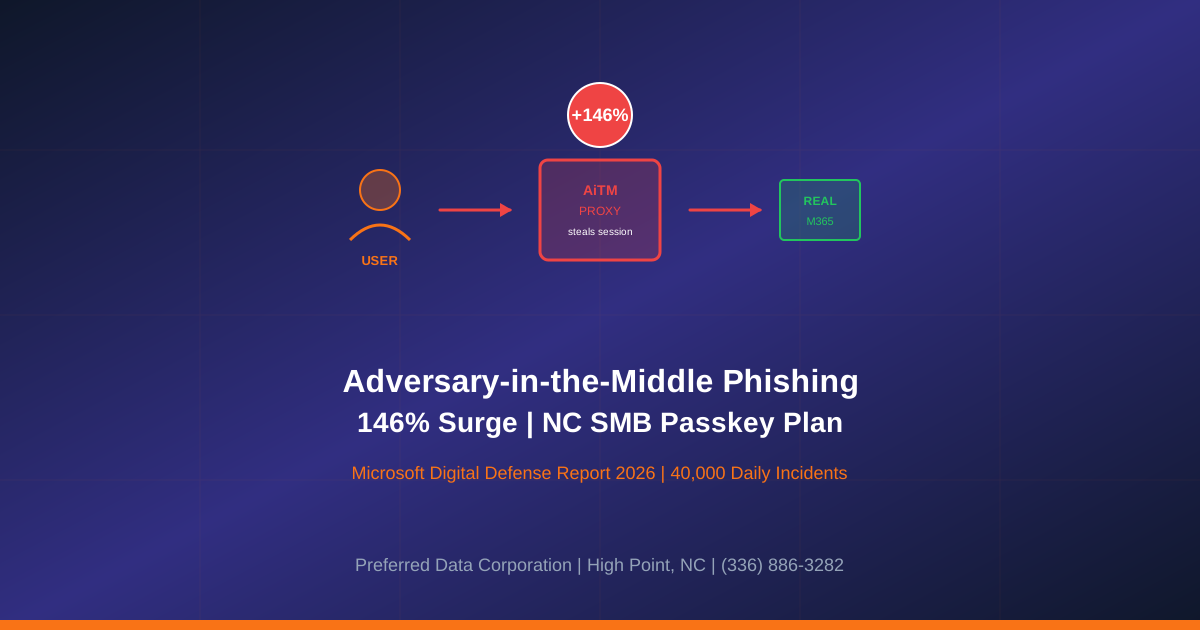
AiTM phishing is a session-stealing technique where the attacker stands up a reverse proxy between the victim and the legitimate login page. The victim enters their username and password on the proxy, the proxy forwards them to the real site, the real site issues the MFA challenge, the victim completes it on the proxy, and the proxy captures the resulting session cookie. Per Microsoft's analysis and Obsidian Security's 2026 explainer:
- The user sees a legitimate Microsoft, Google, Okta, or Salesforce login UI and a real MFA prompt.
- MFA succeeds; the user lands on the real application.
- The attacker now holds a valid session cookie and can replay it from anywhere.
Conventional MFA controls (authenticator apps, SMS codes, push notifications) are all defeated because the attacker is not breaking the MFA; the attacker is letting the victim complete it and then stealing the proof.
How big is the AiTM problem for NC SMBs?
Three numbers from the 2026 reports frame the urgency:
- 146% YoY increase in AiTM attacks, per Microsoft's 2026 Digital Defense Report.
- 40,000 AiTM incidents detected daily in Microsoft 365, per Microsoft's identity threat detection telemetry.
- Median time from session-token theft to first malicious action is under 30 minutes, per Microsoft's research.
For an NC SMB with 25-100 employees on Microsoft 365 or Google Workspace, the practical impact is that any user who clicks an AiTM phishing link from any device can hand the attacker a live session in seconds, even with MFA enabled on every account.
Why does conventional MFA fail against AiTM?
Because conventional MFA proves "the user is here right now," but it does not prove "the user is talking to the real site." The cryptographic difference matters:
| MFA Factor | Stops password reuse | Stops AiTM session theft | Phishing-resistant |
|---|---|---|---|
| SMS OTP | Yes | No | No |
| Authenticator app TOTP | Yes | No | No |
| Push notification | Yes | No | No |
| Hardware token OTP (RSA SecurID) | Yes | No | No |
| FIDO2 security key (YubiKey, etc.) | Yes | Yes | Yes |
| Platform passkey (Windows Hello, Touch ID, Face ID, Android) | Yes | Yes | Yes |
| Smart card / PIV | Yes | Yes | Yes |
FIDO2 and passkeys defeat AiTM because they use WebAuthn, which signs a cryptographic challenge tied to the origin (the actual hostname). When the AiTM proxy is on a lookalike domain, the browser refuses to release the signature. The user cannot be tricked into authenticating on the wrong site, no matter how convincing the lure.
Quotable definition: Phishing-resistant MFA is an MFA factor where the cryptographic protocol binds authentication to the legitimate origin, so an attacker's lookalike site cannot complete the challenge even if the user follows every prompt. Per CISA's 2026 guidance, only FIDO2, passkeys, and PIV smart cards qualify.
Is my NC SMB exposed to AiTM phishing right now?
Use this five-question screen. If any answer is "yes" or "I am not sure," treat the exposure as active.
| Screen question | Why it matters |
|---|---|
| Are any user accounts protected only by SMS, authenticator app, or push MFA? | Those factors are bypassable by AiTM kits |
| Do you allow MFA from any device, anywhere, with no device compliance check? | Stolen tokens replay from any geography |
| Are your finance, IT, HR, and executive accounts using the same MFA factor as general staff? | High-value accounts need phishing-resistant MFA first |
| Do you have a conditional access policy that blocks legacy authentication and unknown geographies? | AiTM tokens often replay from cloud-hosted IPs |
| Have you tested user response to a simulated AiTM phishing kit in the last 90 days? | Real-world resilience needs measurement, not assumption |
A fast self-check in Microsoft Entra ID: review the "Sign-ins" log for the past 30 days, sort by "Conditional Access Status," and look for legacy auth attempts, impossible-travel sign-ins, and successful sign-ins from autonomous system numbers (ASNs) belonging to cloud providers (DigitalOcean, OVH, Hetzner, Vultr). Multiple successes from hosted ASNs are a near-certain AiTM signal.
What is the right passkey and FIDO2 rollout plan for an NC SMB?
A 30-day phased migration is achievable for any NC SMB on Microsoft 365 or Google Workspace. PDC sequences it this way:
- Week 1 - Tier 0 enrollment. Issue FIDO2 security keys (YubiKey 5C NFC or equivalent) to every account with global admin, billing admin, AD admin, finance approval, payroll, or HR access. Enroll passkeys on company-managed Windows and Mac devices. Disable SMS as an MFA factor for these accounts.
- Week 2 - Conditional Access hardening. Configure Microsoft Entra ID Conditional Access (or Google equivalent) to require phishing-resistant MFA for admin roles, block legacy authentication tenant-wide, require compliant or hybrid-joined devices for SharePoint and Exchange access, and block unknown geographies.
- Week 3 - General staff passkey enrollment. Enroll passkeys on all company-managed devices. For BYOD, provide passkey enrollment via the user's personal device. Run training on the new prompt UX so users do not bypass to a phishing-vulnerable fallback.
- Week 4 - Decommission weak factors. Remove SMS as a fallback for all accounts. Reduce authenticator app and push prompt usage to break-glass scenarios only. Simulate an AiTM phishing campaign with an external red team or MSSP to confirm the new floor.
Key takeaway: The 30-day window matters because 146% YoY growth means the AiTM threat is doubling roughly every nine months. An SMB that waits until "next budget cycle" to start the passkey rollout will face two to three times the current attack volume by the time they finish.
What MFA does cyber insurance ask for?
Per Velocity Technology Group's SMB guide, insurers want MFA on email, remote access and privileged accounts.
What about cost?
For a 25-person NC SMB, expect:
- Hardware: $1,200-$3,000 for FIDO2 keys for executives, finance, IT, HR (2 keys per user for primary + backup).
- Software: Conditional Access and passkey enrollment are included in existing Microsoft 365 Business Premium or Google Workspace Business Plus subscriptions.
- Services: 2-4 weeks of PDC managed services time for rollout, training, policy authoring, simulated phishing test, and Conditional Access tuning.
For most NC SMBs, the total project cost is less than one month of expected loss avoidance from a single successful BEC incident. Per the FBI IC3 2026 BEC statistics, the average BEC loss is now over $137,000 for SMBs.
Need a fixed-price passkey and FIDO2 migration this quarter? Call (336) 886-3282 or request a 30-day passkey sprint.
How does Preferred Data Corporation help?
PDC supports NC small businesses with the three layers required to close the AiTM gap:
- Managed cybersecurity with phishing-resistant MFA deployment, Conditional Access engineering, 24/7 identity threat monitoring, and incident response retainer for session-token replay events.
- Managed IT services with passkey enrollment across Microsoft 365 and Google Workspace, device compliance for Windows and Mac, and security awareness training that covers AiTM scenarios in addition to email phishing.
- Network services for segmenting administrative access, enforcing Just-In-Time elevation, and instrumenting east-west traffic so that a stolen session token cannot pivot into domain compromise.
PDC has served NC small businesses, manufacturers, and distributors for over 39 years with on-site coverage within 200 miles of High Point. The combination of local context, 20+ year average client retention, and national-grade identity engineering is what gets phishing-resistant MFA deployed and verified inside one billing cycle.
Frequently Asked Questions
What is an adversary-in-the-middle attack, in one sentence?
AiTM is a phishing attack where the attacker proxies the legitimate login flow to capture the victim's session cookie after MFA completes, defeating conventional MFA without ever knowing the user's password long-term.
Are passkeys really phishing-resistant?
Yes. Per Microsoft's identity guidance and Google's passkey rollout data, passkeys use WebAuthn, which binds the cryptographic challenge to the actual origin (hostname). A phishing site on a lookalike domain cannot complete the challenge, even if the user wants it to.
Should I use FIDO2 security keys or platform passkeys?
For Tier 0 accounts (global admins, financial approvers, HR admins), use hardware FIDO2 security keys (YubiKey or equivalent). For general staff, platform passkeys on company-managed Windows, Mac, iOS, and Android devices are sufficient and more convenient. Most NC SMBs end up with a mix.
Will passkeys work with our older line-of-business apps?
For modern SaaS (Microsoft 365, Google Workspace, Salesforce, ServiceNow, Atlassian, GitHub, Okta, etc.), passkeys are widely supported. For older line-of-business apps that do not support WebAuthn, the answer is to front them with single sign-on (SSO) through Entra ID or Google Workspace, then enforce passkey MFA at the IdP. PDC scopes the SSO + passkey work as one project.
How long does a passkey rollout take for a 50-person SMB?
A typical PDC engagement is 4 weeks from kickoff to general availability, including Tier 0 enrollment in week 1, Conditional Access hardening in week 2, general staff enrollment in week 3, and weak-factor decommissioning in week 4.
Related Resources
- Managed Cybersecurity Services for NC Businesses - 24/7 monitoring, identity threat protection
- Managed IT Services for NC Businesses - Passkey enrollment, device compliance
- Multi-Factor Authentication Business Guide - MFA fundamentals
- Storm Infostealer Session Cookie Theft & MFA Bypass - Companion guide on session theft
- SonicWall Gen6 VPN MFA Bypass May 2026 - Adjacent identity defense
- Contact Preferred Data Corporation - Schedule a passkey migration sprint